Dear Experts,
Really appreciate your help on the below.
First the background info,
OS: CentOS 7.8
$JAVA_HOME
bash: /usr/lib/jvm/java-11-openjdk-11.0.8.10-0.el7_8.x86_64
Alfresco: 6.2 Community Edition
Now here's the problem,
This is my Zimbra settings which I tried from Thunderbird inatalled in the CentOS server.
Email sending works perfectly with Thunderbird.
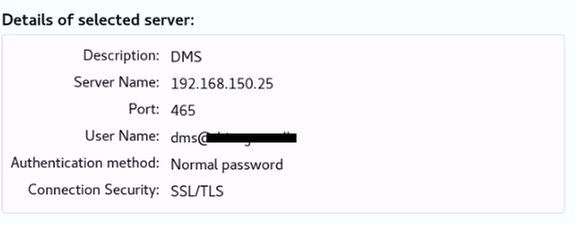
This is my alfresco settings,
mail.host=192.168.150.25
mail.port=465
mail.protocol=smtps
mail.username=dms@abc.com
mail.password=abc
mail.encoding=UTF-8
mail.from.default=dms@abc.com
mail.from.enabled=false
mail.smtps.starttls.enable=false # I tried this with 'true' also, same result
mail.smtps.auth=false # I tried this with 'true' also, same result
with Alfresco, when I tried to send an email (via New task workflow) I get the following error,
ERROR [org.alfresco.repo.action.executer.MailActionExecuter] [mailAsyncAction1] Failed to send email to [sam] : org.springframework.mail.MailSendException: Mail server connection failed; nested exception is javax.mail.MessagingException: Could not connect to SMTP host: 192.168.150.25, port: 465; nested exception is: javax.net.ssl.SSLHandshakeException: PKIX path building failed: sun.security.provider.certpath.SunCertPathBuilderException: unable to find valid certification path to requested target. Failed messages: javax.mail.MessagingException: Could not connect to SMTP host: 192.168.150.25, port: 465; nested exception is: javax.net.ssl.SSLHandshakeException: PKIX path building failed: sun.security.provider.certpath.SunCertPathBuilderException: unable to find valid certification path to requested target; message exceptions (1) are:Failed message 1: javax.mail.MessagingException: Could not connect to SMTP host: 192.168.150.25, port: 465; nested exception is: javax.net.ssl.SSLHandshakeException: PKIX path building failed: sun.security.provider.certpath.SunCertPathBuilderException: unable to find valid certification path to requested target
Then, I tried the following command,
openssl s_client -host 192.168.150.25 -port 465 -showcerts < <(echo QUIT) | openssl x509 -in - -out /home/dmsuser/mail.mycompany.com.crt
for which I got the following response,
[root@localhost security]# openssl s_client -host 192.168.150.25 -port 465 -showcerts < <(echo QUIT) | openssl x509 -in - -out /home/dmsuser/mail.mycompany.com.crt
Error opening Certificate -
140649779169168 02001002:system library:fopen:No such file or directory:bss_file.c:402:fopen('-','r')
14064977916916820074002:BIO routines:FILE_CTRL:system lib:bss_file.c:404:
unable to load certificate
depth=0 OU = Zimbra Collaboration Server, CN = drivegreen.lk
verify error:num=20:unable to get local issuer certificate
verify return:1
depth=0 OU = Zimbra Collaboration Server, CN = drivegreen.lk
verify error:num=21:unable to verify the first certificate
verify return:1
DONE
As far as I understand, smtp server doesn't have a certificate?
Could you please help me with the correct SMTP configuration?
PS: also, I've tried connecting a gmail account and that works fine. Below are gmail settings,
mail.host=smtp.gmail.com
mail.port=465
mail.protocol=smtps
mail.username=abc@gmail.com
mail.password=xxxxxx
mail.from.default=abc@abc.com
mail.from.enabled=false
mail.smtps.starttls.enable=true
mail.smtps.auth=true
Really appreciate your help on this.
Thanks a lot in advance!
