Hi there,
I wish to play with the User Interface and do some experiments on how to create a new 'module' inside Nuxeo.
I know that a module/bundle in Nuxeo has its own concept. Don't get me wrong. But I want to mean with 'module' is to add a totally new screen that is actually a new subsystem that I want to build on top of Nuxeo, which will have its own 'home page' with a lot of features in there.
In order to do it, I want to create a new button in the main menu. By main menu I mean the following:
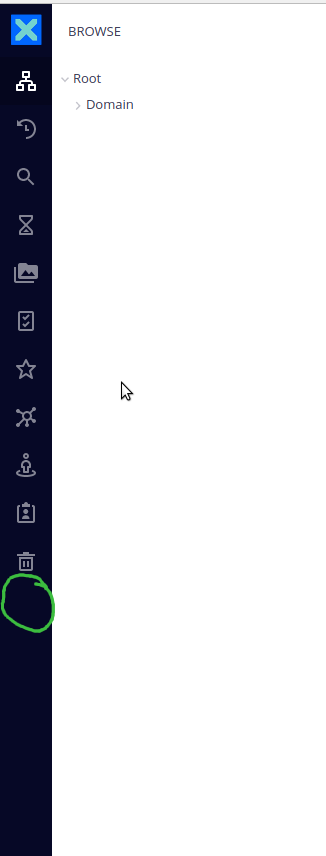
The green circle is where I want the button to appear.
Then, when I click it, instead of just opening that little side-menu with the features for each of those menu items - for example, if you click in the browse menu item it will show the browsing schema - I want to use the entire screen to show some new things, as a form and a document listing of my own query.
The questions are,
a) can I achieve that? Also, how can I do that?
b) Is there any specific documentation on how to deal with that menu? And the big panel as well?
c) Could somebody point me to it?
d) Can it be done in the JSF UI too?
Regards,
Carlos G.
